


Paprika Recipe Manager 3
4.96.54K Reviews
App Specs
- Version
- 3.3.10
- Updated On
- License
- Free
- Downloads
- 500,000+
- Developer
- Hindsight Labs LLC
- Categories
- Food & Drink
- Platform
- Android, iOS
Screenshots
 Analysis by AppCompare
When I cook from a recipe I’ve saved somewhere online, the hardest part is often finding it again and turning it into a workable plan. Paprika Recipe Manager 3 is built for that everyday problem: it gives recipes, meal planning, and shopping lists a shared home. I find it most useful when cooking is a regular routine rather than an occasional project, because the value grows as the collection becomes easier to search and reuse.
Quick to reach, not a shortcut to everything
Paprika is a food and drink app from Hindsight Labs LLC, and its appeal is practical rather than flashy. The app is free to download, with in-app purchases listed from $4.99 to $14.99 per item. It has a 4.9 average from around 20,000 ratings, and more than 500,000 installs. Those figures suggest that many people find a recipe-organizing tool worthwhile, but the best test is whether you’ll actually bring your recipes into it and return to them.
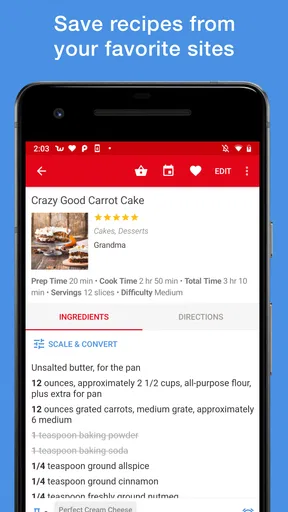
In day-to-day use, the speed that matters most is how quickly I can move from an idea to a recipe I can cook. Saving a recipe from a website can reduce the friction of copying and pasting details into a personal document, while search makes a growing collection more useful than a folder of bookmarks. The trade-off is that organizing a collection takes some attention: if you save everything without useful categories or names, you may still need to browse around later.
Where a larger collection earns its keep
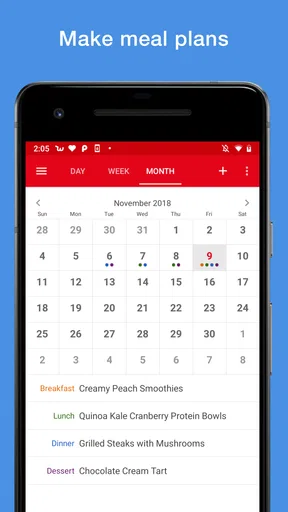
The app’s workflow makes the most sense when a recipe is part of a chain of decisions. I might choose a few dinners, place them on the meal planner, then build a shopping list from those choices. That is more helpful than keeping a calendar in one place and ingredients in another, especially when plans change and I need to check what the week still requires.
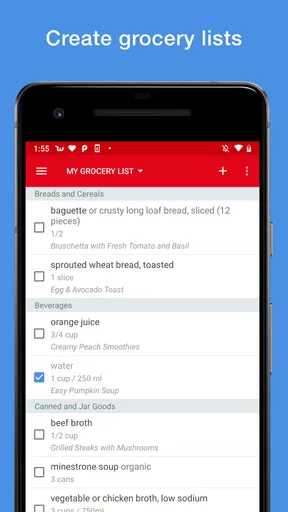
A realistic example is a busy weekday: I pick meals before heading to the shop, use the combined list to avoid overlooking ingredients, and check items off as I go. Removing duplicate ingredients and sorting by aisle can cut down on backtracking. Still, a generated list is a starting point, not a substitute for judgment. I would review quantities and pantry staples before shopping, particularly if I’m combining recipes or changing serving sizes.
Useful flexibility, with a little responsibility
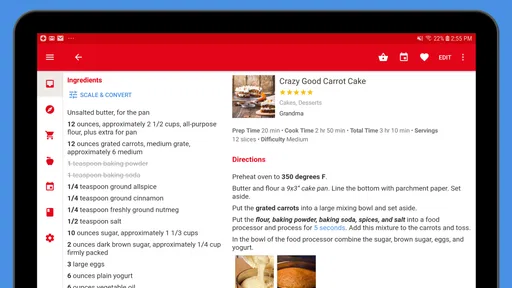
Recipe editing and personal notes are valuable because cooking rarely follows a recipe word for word forever. I can record that a dish needed more acidity, or adjust it for the people I’m cooking for, then keep that knowledge with the recipe instead of relying on memory. Changing serving sizes can also help when a recipe needs to feed more or fewer people, though I’d use common sense with ingredients whose proportions don’t always scale neatly.
Multiple timers are another practical touch when a meal has several parts. They help me keep track of separate cooking intervals, but they do not replace checking food or coordinating the oven and stovetop. The app can support an organized cook; it cannot make every dish finish at precisely the same moment.
Worth Reading Before You Choose

EA SPORTS FC Mobile 26 Is a Bigger Football Game, but It Takes Time

Flipboard Shows What News Apps Must Do Beyond the Feed

Switching to Android Auto Means Rethinking Your Driving Routine

Google Calendar Makes a Crowded Week Easier to Manage

Ludo King Makes the Most of the Minutes Between Plans

Baby Panda World Brings Quick Play to Modern Phones, but Its Game Library Feels Busy
Organizational Bliss
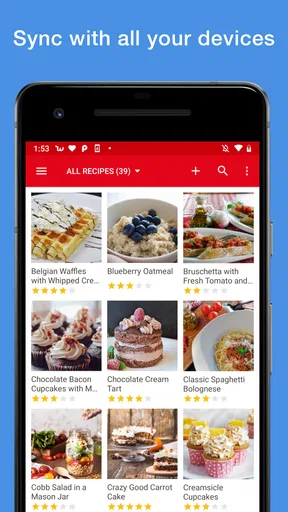
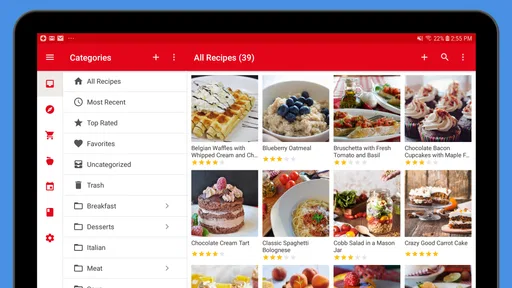
The first thing that strikes you about Paprika Recipe Manager 3 is its impeccable organization. It's a dream come true for anyone who loves to cook but struggles with keeping all those recipes in order. You can easily save recipes from your favorite websites directly into the app. No more frantic searches through bookmarks or messy printouts.
What’s really cool is that you can categorize recipes by meal type, cuisine, or even dietary preferences. The search functionality is top-notch, so finding that vegan lasagna recipe you saved months ago is a breeze.
Seamless Grocery Shopping
Let’s talk about the grocery list feature, which is honestly a lifesaver. With just a tap, you can add ingredients from any recipe to your shopping list. It even removes duplicates and sorts items by aisle. So, not only are you saving time, but you’re also avoiding those frustrating mid-aisle "what else do I need?" moments.
Plus, the app syncs across devices, meaning you can add items on your tablet at home and check them off on your phone in the store. Multitasking has never been easier!
Meal Planning Made Easy
With the meal planner, you can schedule meals for the week, and the app will automatically create a shopping list based on the recipes you’ve chosen. This is perfect for those who love to meal prep or need to stick to a budget. Say goodbye to last-minute takeouts because you forgot to plan dinner!
The drag-and-drop calendar makes it easy to rearrange meals, so if you decide Wednesday’s taco night should be Thursday instead, you can switch it up without a hassle.
Customizable Experience
One of the standout features is the ability to customize recipes. Whether you want to adjust serving sizes or tweak ingredients to suit your taste, the app allows you to edit recipes directly. You can also add personal notes, which is handy for jotting down any adjustments or cooking tips.
"Cooking should be fun, not stressful. Paprika Recipe Manager 3 makes sure of that."
The app also supports multiple timers, ensuring that your main dish and sides are perfectly timed. No more overcooked potatoes or undercooked chicken!
Intuitive Design
Let’s face it, no one wants to deal with a clunky app while cooking. Thankfully, Paprika Recipe Manager 3 boasts a clean and intuitive interface. Even if you’re not a tech guru, you’ll find it easy to navigate. The developers have clearly put a lot of thought into user experience, making it straightforward to access all of the app’s features.
The app’s vibrant design and easy-to-read text make it enjoyable to use, even when your hands are covered in flour or you’re juggling multiple dishes.
Conclusion
Overall, Paprika Recipe Manager 3 is a must-have for anyone who loves cooking or wants to streamline their culinary adventures. It’s not just an app but a comprehensive kitchen companion that transforms how you plan, shop, and cook.
Whether you’re a seasoned chef or a home cook trying to organize your recipe chaos, this app is worth checking out. You’ll wonder how you ever managed without it!
How it fits different cooking habits
I would recommend Paprika to someone who saves recipes from several websites and is tired of searching through browser bookmarks, messages, and screenshots. It is also a good fit for households where one person chooses meals and another does the shopping: a shared recipe-and-list routine is easier to follow than a stream of separate reminders. The app is less compelling if you only cook from a handful of familiar dishes or prefer to improvise without recording recipes.
Compared with a notes app, Paprika gives recipes a more deliberate structure and connects them to planning and shopping. Compared with a general grocery-list app, its advantage is that the list can start from meals rather than from a blank page. A spreadsheet can be more flexible for someone who enjoys building a custom food database, while a recipe website may be better if discovering new dishes is the main goal. Paprika is strongest when you already have recipes you want to keep and use.
Small habits that prevent kitchen friction
One useful approach is to treat the recipe collection as a working cookbook, not an archive. When saving something, I would make sure its category reflects how I expect to find it later: by meal, cuisine, or dietary need. Then, after cooking, a short note about a substitution or timing adjustment can turn a merely saved recipe into one that suits my own kitchen. These details matter most after several months, when memory of the first attempt has faded.
I’d also plan only the meals I realistically expect to cook. A full calendar can look satisfying, but an unexpected late day or leftover dinner can make the plan feel like another obligation. Moving a meal to another day is easy, yet the shopping list still deserves a quick review after changes. That is especially true when ingredients are shared across dishes or when a recipe has been edited for a different serving count.
For shopping with another person, the cross-device sync can make the handoff smoother: one person can prepare the plan at home and the other can consult the list at the store. I would agree on who is editing the list, though, rather than making changes in two places at once and assuming every detail is settled. The workflow is helpful, but a quick check before leaving prevents a small planning mismatch from becoming a missing-ingredient problem.
What to expect from performance and reliability
I see this as a focused utility, not a demanding cooking simulator or a visually elaborate food magazine. Its main jobs—finding a saved dish, adding ingredients, and arranging meals—are straightforward, so a modest phone should not need high-end hardware simply to make the basic idea useful. The current version is 3.3.10 and the minimum Android requirement is 5.0, which makes it accessible to a broad range of Android devices. I would still expect older hardware to feel less fluid in general than a newer phone, particularly when switching between apps, rather than assume the recipe tool can change the device’s limits.
For reliability, the cross-device workflow is a genuine convenience, but it also means I would not make a single app the only place a treasured family recipe exists. Keep an independent copy of anything irreplaceable, especially before changing devices or reorganizing a large collection. That is sensible housekeeping for any digital cookbook; it is not a claim that Paprika loses recipes. If an item does not appear where I expect, I would first check which device I edited and whether the list or plan reflects the latest change before rebuilding it from scratch.
The app is rated for Everyone, so it is suitable for a household audience, though the best fit is still a person who wants to manage recipes rather than simply browse food content. Its free entry point makes it easy to try the workflow, while the in-app purchases mean I would check the purchase choices in the app before deciding what level of use suits me. I would skip it if I need a recipe service to do all the discovery for me, or if I do not want to maintain a personal collection at all.
My practical verdict
What makes Paprika worthwhile is not one isolated feature but the path from saved recipe to planned meal to checked-off ingredients. That chain can save mental effort for someone who cooks at home repeatedly, especially when their recipes are scattered across the web. The most useful way to judge it is to bring in a small set of meals you actually make, use them to plan a normal week, and see whether the list and notes make cooking feel more orderly.
It is not a replacement for cooking judgment, a guarantee that every week will go to plan, or the ideal choice for someone who only wants fresh recipe inspiration. But if your main frustration is losing track of dishes you already like, I think its combination of organized recipes, meal planning, shopping lists, and personal edits is a sensible answer. Give it a realistic trial with your own routine, and you’ll know whether a dedicated recipe manager earns a place in your kitchen.
Pros
- User-friendly interface simplifies navigation.
- Syncs recipes across all your devices.
- Customizable categories for easy organization.
- Grocery list integrates with recipes seamlessly.
- Automatic recipe import from various websites.
Cons
- Limited free version features.
- No integration with voice assistants.
- Requires manual input for some data.
- No meal planning calendar view.
- Occasional sync delays between devices.
FAQs for Paprika Recipe Manager 3
What platforms is Paprika Recipe Manager 3 available on?
Paprika Recipe Manager 3 is available on multiple platforms, including Android, iOS, macOS, and Windows. This flexibility allows users to sync their recipes across devices, ensuring access to their culinary creations whether on a smartphone, tablet, or desktop. Make sure to have a compatible device before downloading.
Does Paprika Recipe Manager 3 support cloud synchronization?
Yes, Paprika Recipe Manager 3 supports cloud synchronization, allowing you to seamlessly sync your recipes across all your devices. This feature ensures that any changes made on one device are reflected on others, providing a smooth and consistent recipe management experience. An account setup is required for this feature.
Can I import recipes from websites into Paprika Recipe Manager 3?
Absolutely! Paprika Recipe Manager 3 offers a powerful web browser within the app that lets you easily import recipes from various websites. This feature simplifies the process of adding new recipes to your collection, allowing you to build a diverse and extensive recipe library with minimal effort.
Is there a grocery list feature in Paprika Recipe Manager 3?
Yes, Paprika Recipe Manager 3 includes a handy grocery list feature. You can add ingredients from your recipes directly to the list, which helps streamline your shopping experience. The list is organized by aisle, making it easier to navigate stores and ensure you don’t forget any essential ingredients.
How user-friendly is the Paprika Recipe Manager 3 interface?
Paprika Recipe Manager 3 boasts a user-friendly interface designed for ease of use. Its intuitive layout allows users to easily navigate between recipes, meal planning, and grocery lists. Tooltips and clear instructions further enhance the user experience, making it accessible for both tech-savvy users and beginners alike.


